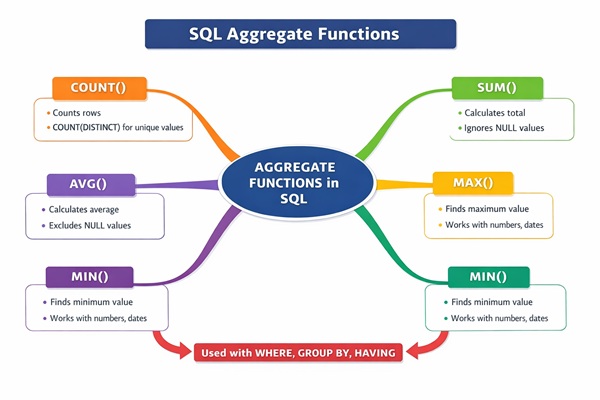
SQL Aggregate Functions: An aggregate function performs a calculation on a set of values, and returns a single value. Except for COUNT(*), aggregate functions ignore null values. Aggregate functions are often used with the GROUP BY clause of the SELECT
statement.
- Perform calculations like totals, averages, minimum or maximum values on data.
- Ignore NULL values in most functions except COUNT(*), improving result accuracy.
- Work with clauses such as GROUP BY, HAVING and ORDER BY for analysis.
SQL Aggregate Functions:
The most commonly used SQL aggregate functions are:
MIN()– returns the smallest value within the selected columnMAX()– returns the largest value within the selected columnCOUNT()– returns the number of rows in a setSUM()– returns the total sum of a numerical columnAVG()– returns the average value of a numerical column
Aggregate functions ignore null values (except for COUNT(*)).
Example of GROUP BY and Aggregate Functions:
Typically, the two functions are used together to summarise a database. Let’s consider a simple example of database of voters. The database is called Voter_List. For each voter, Voter_List has the following columns:
Voter_ID
City_Name
State_Name
Language_Spoken
For our example, let us count the number of voters in each city. To do so, we will run the following SQL command:
SELECT City_Name
COUNT (Voter_ID) Voter_Count
FROM Voter_List
GROUP BY City_Name
ORDER BY City_Name;
Why Use Aggregate Functions?
Aggregate functions are the most essential ingredient of any database management system. They help us perform many calculations over massive data sets faster and more efficiently. For example, these functions create statements of statistics, drive financial analysis, and maintain inventory levels. Furthermore, aggregate functions can be applied to further our understanding of the data at hand.
Common Table Expression CTE in SQL
COUNT Function in SQL:
It is used to count the number of rows in a table. It helps summarize data by giving the total number of entries. It can be used in different ways depending on what you want to count:
- COUNT(*): Counts all rows.
- COUNT(column_name): Counts non-NULL values in the specified column.
- COUNT(DISTINCT column_name): Counts unique non-NULL values in the column.
Example of COUNT Function in SQL:
CREATE TABLE employee_projects (
emp_id INT,
emp_name VARCHAR(50),
department VARCHAR(30),
project_id INT,
project_status VARCHAR(20),
hours_worked INT,
start_date DATE
);
INSERT INTO employee_projects
(emp_id, emp_name, department, project_id, project_status, hours_worked, start_date)
VALUES
(101, ‘Alice’, ‘IT’, 1001, ‘Completed’, 120, ‘2025-01-01’),
(102, ‘Bob’, ‘IT’, 1002, ‘In Progress’, 80, ‘2025-01-05’),
(103, ‘Carol’, ‘HR’, 1003, ‘Completed’, 60, ‘2025-01-10’),
(104, ‘David’, ‘IT’, 1001, ‘Completed’, 90, ‘2025-01-03’),
(105, ‘Eva’, ‘Finance’, 1004, NULL, 40, ‘2025-01-12’);
SELECT COUNT(*) AS total_records
FROM employee_projects;
Output of COUNT FUNCTION in SQL:
| total_records |
|---|
| 5 |
COUNT(column) – Ignore NULL Values:
SELECT COUNT(project_status) AS status_count
FROM employee_projects;
Output
| status_count |
|---|
| 4 |
COUNT with WHERE Condition:
SELECT COUNT(*) AS completed_projects
FROM employee_projects
WHERE project_status = ‘Completed’;
Output
| completed_projects |
|---|
| 3 |
COUNT with GROUP BY:
SELECT department, COUNT(emp_id) AS employee_count
FROM employee_projects
GROUP BY department;
Output
| department | employee_count |
|---|---|
| IT | 3 |
| HR | 1 |
| Finance |
COUNT(DISTINCT column):
SELECT COUNT(DISTINCT project_id) AS unique_projects
FROM employee_projects;
Output
| unique_projects |
|---|
| 3 |
COUNT(DISTINCT) with HAVING:
SELECT project_id, COUNT(DISTINCT emp_id) AS emp_assigned
FROM employee_projects
GROUP BY project_id
HAVING COUNT(DISTINCT emp_id) > 1;
Output
| project_id | emp_assigned |
|---|---|
| 1001 | 3 |
SUM Function in SQL:
It is used to calculate the total of a numeric column. It adds up all non-NULL values in that column for Example, SUM(column_name) returns sum of all non-NULL values in the specified column.
SQL CASE Statement – A Comprehensive Guide
Example of SUM Function in SQL:
SELECT SUM(hours_worked) AS total_hours
FROM employee_projects;
Output
total_hours
390
SUM() with WHERE Clause:
SELECT SUM(project_cost) AS completed_project_cost
FROM employee_projects
WHERE project_status = ‘Completed’;
Output
completed_project_cost
120000
SUM() with GROUP BY:
SELECT department, SUM(hours_worked) AS dept_hours
FROM employee_projects
GROUP BY department;
Output
| department | dept_hours |
|---|---|
| IT | 290 |
| HR | 60 |
| Finance | 40 |
SUM() with HAVING:
SELECT department, SUM(hours_worked) AS total_hours
FROM employee_projects
GROUP BY department
HAVING SUM(hours_worked) > 100;
Output
| department | total_hours |
|---|---|
| IT | 290 |
SUM() with DISTINCT:
SELECT SUM(DISTINCT project_cost) AS distinct_project_cost
FROM employee_projects;
Output
distinct_project_cost
100000
AVG Function in SQL:
It is used to calculate average value of a numeric column. It divides sum of all non-NULL values by the number of non-NULL rows for Example, AVG(column_name) returns average of all non-NULL values in the specified column.
AVG is calculated as:
SUM(project_cost) / COUNT(project_cost)
SELECT AVG(project_cost) AS avg_cost
FROM employee_projects;
Output
avg_cost
37500
MAX Function in SQL:
Maximum hours worked by any employee
SELECT MAX(hours_worked) AS max_hours
FROM employee_projects;
Output
max_hours
120
MAX() on Non-Numeric Columns:
SELECT MAX(start_date) AS latest_start_date
FROM employee_projects;
Output
latest_start_date
2025-01-12
MIN Function in SQL:
Minimum hours worked by any employee:
SELECT MIN(hours_worked) AS min_hours
FROM employee_projects;
Output
min_hours
40
Final Thought:
SQL Aggregate Functions – Summary Table
| Function | What it Does | Works On | Ignores NULL? | Common Usage Example |
|---|---|---|---|---|
| COUNT(*) | Counts total rows | Rows | No | COUNT(*) |
| COUNT(column) | Counts non-NULL values | Any column | Yes | COUNT(emp_id) |
| COUNT(DISTINCT col) | Counts unique values | Any column | Yes | COUNT(DISTINCT dept) |
| SUM(column) | Calculates total | Numeric only | Yes | SUM(salary) |
| AVG(column) | Calculates average | Numeric only | Yes | AVG(marks) |
| MAX(column) | Finds highest value | Number, Date, String | Yes | MAX(salary) |
| MIN(column) | Finds lowest value | Number, Date, String | Yes | MIN(join_date) |
How Aggregate Functions Work (Flow Logic)
| Step | Clause | Purpose |
|---|---|---|
| 1 | FROM |
Select table |
| 2 | WHERE |
Filter rows (before aggregation) |
| 3 | GROUP BY |
Create groups |
| 4 | AGGREGATE FUNCTION | COUNT / SUM / AVG / MIN / MAX |
| 5 | HAVING |
Filter groups (after aggregation) |
| 6 | SELECT |
Display result |