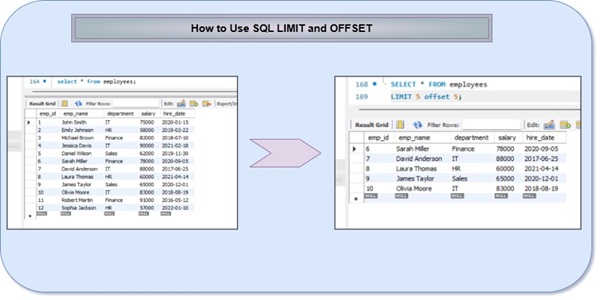
How to Use SQL LIMIT and OFFSET – The SQL LIMIT helps you retrieve only a specific portion of data instead of the entire result set, which is especially useful when working with large databases. SQL OFFSET clause is used to skip a specified number of rows in a query result. It is often combined with the LIMIT clause for data pagination.
How to Use SQL LIMIT and OFFSET:
The LIMIT clause is an important tool in SQL that allows you to control the number of rows returned by a query. This clause is especially useful when you have large datasets and only need to see a portion of the data. In this lesson, we’ll explore how to use the LIMIT clause and its various use cases
What LIMIT and OFFSET Do:
The SQL LIMIT and OFFSET clause are used to control the number of rows returned by a query and the starting point of the result set, respectively.
LIMIT: Specifies the maximum number of rows to return from the query.
OFFSET: Specifies the number of rows to skip before returning the result set.
By using these commands together, you can effectively paginate through large datasets, displaying a manageable number of results at a time.
Basic Syntax and Usage for SQL LIMIT and OFFSET:
The basic syntax for using LIMIT and OFFSET in SQL is:
SELECT column1, column2, …
FROM table_name
[WHERE condition]
[ORDER BY column1, column2, …]
LIMIT number_of_rows
OFFSET number_of_rows_to_skip
SQL LIMIT and OFFSET Example:
First, we will create a demo SQL database and table, on which we will use the LIMIT and offset Clause command.

Create a Demo Database:
CREATE DATABASE demo_db;
USE demo_db;
Create a Table:
CREATE TABLE employees (
emp_id INT PRIMARY KEY,
emp_name VARCHAR(50),
department VARCHAR(30),
salary INT,
hire_date DATE
);
Insert Sample Data:
INSERT INTO employees VALUES
(1, ‘John Smith’, ‘IT’, 75000, ‘2020-01-15’),
(2, ‘Emily Johnson’, ‘HR’, 58000, ‘2019-03-22’),
(3, ‘Michael Brown’, ‘Finance’, 82000, ‘2018-07-10’),
(4, ‘Jessica Davis’, ‘IT’, 90000, ‘2021-02-18’),
(5, ‘Daniel Wilson’, ‘Sales’, 62000, ‘2019-11-30’),
(6, ‘Sarah Miller’, ‘Finance’, 78000, ‘2020-09-05’),
(7, ‘David Anderson’, ‘IT’, 88000, ‘2017-06-25’),
(8, ‘Laura Thomas’, ‘HR’, 60000, ‘2021-04-14’),
(9, ‘James Taylor’, ‘Sales’, 65000, ‘2020-12-01’),
(10, ‘Olivia Moore’, ‘IT’, 83000, ‘2018-08-19’),
(11, ‘Robert Martin’, ‘Finance’, 91000, ‘2016-05-12’),
(12, ‘Sophia Jackson’, ‘HR’, 57000, ‘2022-01-10’);
LIMIT Clause – Basic Usage:
SELECT * FROM employees
LIMIT 5;
- Returns only 5 rows
- Reduces memory usage
- Faster than fetching all records
LIMIT and OFFSET with WHERE Clause:
Example: Get IT department employees (first 3)
SELECT * FROM employees
WHERE department = ‘IT’
LIMIT 3 OFFSET 0;
Next page (IT employees)
SELECT * FROM employees
WHERE department = ‘IT’
LIMIT 3 OFFSET 3;
- WHERE filters data before pagination
- Ideal for filtered search results
LIMIT and OFFSET with ORDER BY:
Highest paid employees (Top 5)
SELECT * FROM employees
ORDER BY salary DESC
LIMIT 5;
Second page of highest paid employees
SELECT * FROM employees
ORDER BY salary DESC
LIMIT 5 OFFSET 5;
ORDER BY salary DESCsorts highest salary first- LIMIT ensures only required rows are returned
Combining LIMIT and OFFSET for Pagination:
By combining LIMIT and OFFSET, you can easily implement pagination, allowing users to navigate through large result sets one page at a time. This is particularly useful when displaying data in a user interface or when working with datasets that are too large to display all at once.
For example, to display 10 results per page, you can use the following query:
SELECT * FROM contacts
LIMIT 10
OFFSET (page_number – 1) * 10
Here, the page_number variable would be used to calculate the appropriate OFFSET value for each page of results.
Pagination with WHERE and ORDER BY and LIMIT and OFFSET (Real-World):
Example: IT employees ordered by hire date (Newest first)
SELECT emp_id, emp_name, hire_date
FROM employees
WHERE department = ‘IT’
ORDER BY hire_date DESC
LIMIT 2 OFFSET 0;
Page 2
SELECT emp_id, emp_name, hire_date
FROM employees
WHERE department = ‘IT’
ORDER BY hire_date DESC
LIMIT 2 OFFSET 2;
Performance Benefits of Limiting Result Sets:
Limiting the number of rows returned by a query can have significant performance benefits, especially when working with large datasets. By reducing the amount of data that needs to be processed and transferred, you can improve query execution times and reduce the strain on system resources.
Performance Impact
| Query Type | Execution Time | Resource Usage |
|---|---|---|
| No LIMIT | High | High |
| LIMIT 10 | Very Low | Minimal |
| LIMIT and Index | Extremely Fast | Optimized |
This is particularly important when working with Google Sheets, as the platform has limitations on the amount of data it can effectively handle. Using LIMIT and OFFSET can help you avoid hitting these limits and ensure your queries run smoothly.
What are some practical uses of the LIMIT clause?
- Pagination: When combined with the OFFSET clause, LIMIT can be used to display data in smaller chunks, like on different web pages.
- Performance optimization: LIMIT can improve query performance by reducing the amount of data transferred between the database and the application. This can lead to faster response times and less strain on system resources.
- Data sampling: LIMIT can be used to retrieve smaller data subsets for analysis or testing purposes.
- Top N queries: LIMIT can be used to find the top number of records from a result set, such as the top 10 highest paid employees.
- Security and privacy: LIMIT can help enforce security and privacy policies by limiting data access to what’s necessary.
How does OFFSET change the starting point of results?
- Skipping rows: OFFSET dictates how many rows to bypass before returning results.
- Combined with LIMIT: OFFSET can be used with LIMIT to specify both the starting position and the number of rows returned. This enables result set pagination.
- OFFSET value: The OFFSET value must be zero or greater, and cannot be negative.
- Default OFFSET: OFFSET 0 or an OFFSET with a NULL argument is the same as omitting the OFFSET clause.
- Non-unique sorting: When using non-unique sorting columns, caution is required to avoid duplicate records.
Advanced Techniques: OFFSET and FETCH:
Used in SQL Server, PostgreSQL, Oracle
Syntax:
SELECT column_list
FROM table_name
ORDER BY column
OFFSET n ROWS FETCH NEXT m ROWS ONLY;
Example:
SELECT * FROM employees
ORDER BY emp_id
OFFSET 5 ROWS FETCH NEXT 5 ROWS ONLY;
- OFFSET → rows to skip
- FETCH NEXT → rows to return
- More readable & standard-compliant
OFFSET vs Keyset Pagination (Advanced Concept):
OFFSET-based (Slower for large data):
SELECT * FROM employees
ORDER BY emp_id
LIMIT 5 OFFSET 1000;
Keyset Pagination (Faster):
SELECT * FROM employees
WHERE emp_id > 1000
ORDER BY emp_id
LIMIT 5;
Final Thought for SQL LIMIT and OFFSET:
The LIMIT and OFFSET clauses play a vital role in SQL by controlling the number of rows returned from a query and enabling efficient pagination. They help improve performance by reducing unnecessary data retrieval, lowering memory usage, and speeding up query execution. When combined with ORDER BY, they ensure consistent and predictable results, while using them with WHERE allows filtered, page-wise data access.
Restrictions on the LIMIT clause:
- With regard to defining a view
- The use of nested SELECT statements
- Except for subqueries with table expressions specified in the FROM clause.
- Embedded SELECT statements are used as expressions in a singleton SELECT (where max = 1) within an SPL routine
- where embedded SELECT statements are used as expressions.
Although LIMIT and OFFSET work well for small to medium datasets, large OFFSET values can impact performance. In such cases, SQL-standard OFFSET–FETCH or keyset pagination offers better scalability.
Frequently Asked Questions (FAQ) regarding How to Use SQL LIMIT and OFFSET:
1. What is the main drawback of OFFSET in large tables?
Large OFFSET values cause poor performance because the database must scan and discard many rows.
2. What is OFFSET and FETCH in SQL?
OFFSET and FETCH are SQL-standard pagination clauses used in SQL Server, PostgreSQL, and Oracle.
3. What is Keyset Pagination and why is it faster?
Keyset pagination uses a reference column instead of OFFSET, avoiding row skipping.
4. Can LIMIT and OFFSET be used with WHERE clause?
The WHERE clause filters records before pagination is applied.
SELECT * FROM employees
WHERE department = ‘IT’
ORDER BY emp_id
LIMIT 5 OFFSET 0;
5. Why should LIMIT and OFFSET always be used with ORDER BY?
Without ORDER BY, SQL does not guarantee row order. Pagination without ordering can return inconsistent results across pages.
6. What does OFFSET do in SQL?
OFFSET skips a specified number of rows before starting to return results. It is commonly used for pagination.
7. What is the purpose of the LIMIT clause in SQL?
The LIMIT clause restricts the number of rows returned by a query. It is mainly used to improve performance and control the result size, especially when working with large tables.