INNER JOIN vs OUTER JOIN in SQL: Key Differences – JOIN in SQL is the process of merging two or more tables into one. One unique kind of connection that has one or more main keys is a linked table.
INNER JOIN vs OUTER JOIN in SQL:
The main difference between an INNER JOIN and an OUTER JOIN is that the inner join will keep only the information from both tables that’s related to each other (in the resulting table). An Outer Join, on the other hand, will also keep information that is not related to the other table in the resulting table.
What is a JOIN in SQL?
Joins in SQL are used to combine data and rows from two or more tables based on a common column or a field. There are two main types of joins in SQL : inner joins and outer joins.
Inner joins return common information between tables and an outer join returns information in the resulting table that the inner join returns along with the information that is not common with the other table.
What is INNER JOIN?
The inner join in SQL will return the common or the matching records between the tables in the resulting table. It can be represented as:
How INNER JOIN Works:
When the database runs an INNER JOIN, it does this internally:
-
Reads rows from one table
-
Searches for matching rows in the other table
-
Keeps only matching pairs
-
Immediately ignores rows with no match
-
Outputs the matched result set
Memory & Execution Insight
-
Matches are processed in memory
-
Temporary structures (hash tables or sorted buffers) may be used
-
The engine stops checking once a match fails
The syntax for INNER JOIN in SQL is:
SELECT *
FROM table_name_1
INNER JOIN table_name_2
ON table_name_1.common_field = table_name_2.common_field;
An Example For INNER JOIN:
Create Tables:
CREATE TABLE countries_europe (
country_id INT PRIMARY KEY,
country_name VARCHAR(50),
region VARCHAR(30)
);
CREATE TABLE cities_europe (
city_id INT PRIMARY KEY,
city_name VARCHAR(50),
country_id INT,
population INT
);
Insert Data:
INSERT INTO countries_europe VALUES
(1,’Germany’,’Western Europe’),
(2,’France’,’Western Europe’),
(3,’Italy’,’Southern Europe’),
(4,’Spain’,’Southern Europe’),
(5,’Netherlands’,’Western Europe’),
(6,’Belgium’,’Western Europe’),
(7,’Sweden’,’Northern Europe’),
(8,’Norway’,’Northern Europe’),
(9,’Poland’,’Eastern Europe’),
(10,’Austria’,’Central Europe’);
INSERT INTO cities_europe VALUES
(101,’Berlin’,1,3600000),
(102,’Munich’,1,1500000),
(103,’Hamburg’,1,1800000),
(104,’Paris’,2,2140000),
(105,’Lyon’,2,520000),
(106,’Marseille’,2,870000),
(107,’Rome’,3,2870000),
(108,’Milan’,3,1350000),
(109,’Naples’,3,960000),
(110,’Madrid’,4,3200000),
(111,’Barcelona’,4,1600000),
(112,’Valencia’,4,800000),
(113,’Amsterdam’,5,870000),
(114,’Rotterdam’,5,650000),
(115,’Brussels’,6,1200000),
(116,’Stockholm’,7,980000),
(117,’Oslo’,8,700000),
(118,’Warsaw’,9,1800000),
(119,’Krakow’,9,770000),
(120,’Vienna’,10,1900000);
INNER JOIN with IF EXISTS (Backend Filter):
IF EXISTS (
SELECT 1 FROM cities_europe
)
BEGIN
SELECT
c.country_name,
ci.city_name,
ci.population
FROM countries_europe c
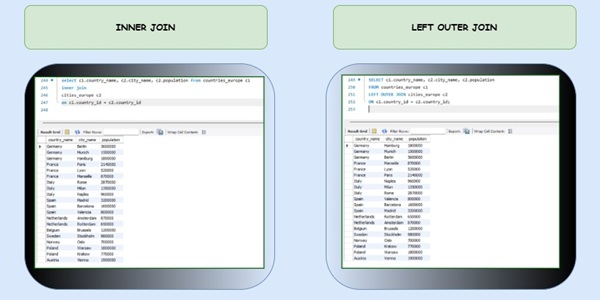
INNER JOIN cities_europe ci
ON c.country_id = ci.country_id;
END;
OUTPUT:
| country_name | city_name | population |
|---|---|---|
| Germany | Berlin | 3600000 |
| Germany | Munich | 1500000 |
| France | Paris | 2140000 |
| Italy | Rome | 2870000 |
| Spain | Madrid | 3200000 |
| Netherlands | Amsterdam | 870000 |
| Poland | Warsaw | 1800000 |
| Austria | Vienna | 1900000 |
Backend Execution Logic of INNER join:
Step-by-Step:
-
IF EXISTS check
-
Confirms table has data
-
Avoids unnecessary execution
-
-
Optimizer chooses join strategy
-
Likely Hash Join (medium dataset)
-
-
Build hash table
-
Smaller table:
countries_europe
-
-
Scan cities_europe
-
Lookup matching
country_id
-
-
Match found → output row
-
No match → discard
What is OUTER JOIN?
An outer join returns a set of records (or rows) that includes those returned by the inner join, along with other rows for which no corresponding match was found in the other table.
There are three types of outer joins:
- Left outer join (or left join)
- Right outer join (or right join)
- Full Outer Join (or Full Join)
Outer joins are used when you want to return all data, not just the interrelated data. The next few sections of this article will describe each of the outer joins.
What is LEFT OUTER JOIN?
The left outer join is one of the types of outer join which returns all the records from the left table and only the matching and related records from the right table. The left join or the left outer join is the combination of the result of the inner join plus all the records of the left table.
The syntax for LEFT OUTER JOIN:
SELECT student_details_1.name, student_details_2.city
FROM student_details_1
LEFT JOIN student_details_2
ON student_details_1.roll_number = student_details_2.roll_number;
An Example For LEFT OUTER JOIN:
SELECT
c.country_name,
ci.city_name,
ci.population
FROM countries_europe c
LEFT OUTER JOIN cities_europe ci
ON c.country_id = ci.country_id;
How LEFT OUTER JOIN Works:
-
Database scans countries_europe first
-
Tries to find matching rows in cities_europe
-
If match found → return data
-
If no match → return NULL for city columns
OUTPUT:
| country_name | city_name | population |
|---|---|---|
| Germany | Berlin | 3600000 |
| Germany | Munich | 1500000 |
| France | Paris | 2140000 |
| Austria | Vienna | 1900000 |
| Belgium | NULL | NULL |
What is RIGHT OUTER JOIN?
Right join is another type of outer join, which returns all the records from the right table and only the matching records from the left table. The right join or the right outer join is the combination of the result of the inner join plus all the records of the right table.
The syntax for RIGHT OUTER JOIN:
SELECT *
FROM table_name_1
RIGHT JOIN Table_name_2
ON Table_name_1.Common_column_Name=table_name_2.Common_column_name;
An Example For RIGHT OUTER JOIN:
SELECT
c.country_name,
ci.city_name,
ci.population
FROM countries_europe c
RIGHT OUTER JOIN cities_europe ci
ON c.country_id = ci.country_id;
How RIGHT OUTER JOIN Works:
-
Database scans cities_europe first
-
Tries to find matching rows in countries_europe
-
If no match → country columns become NULL
OUTPUT:
| country_name | city_name | population |
|---|---|---|
| Germany | Berlin | 3600000 |
| France | Paris | 2140000 |
| NULL | UnknownCity | 500000 |
What is FULL OUTER JOIN?
The full outer join returns all the records from both tables when a match is in either table. It is the combination of the left outer join and the right outer join.
The syntax for FULL OUTER JOIN:
SELECT *
FROM table_name_1
FULL OUTER JOIN Table_name_2
ON Table_name_1.Common_column_Name=table_name_2.Common_column_name;
An Example For FULL OUTER JOIN:
SELECT
c.country_name,
ci.city_name,
ci.population
FROM countries_europe c
FULL OUTER JOIN cities_europe ci
ON c.country_id = ci.country_id;
How FULL OUTER JOIN Works:
-
Combines LEFT JOIN + RIGHT JOIN
-
Returns:
-
Matching rows
-
Unmatched rows from left
-
Unmatched rows from right
-
-
Uses more memory and processing
OUTPUT:
| country_name | city_name | population |
|---|---|---|
| Germany | Berlin | 3600000 |
| France | Paris | 2140000 |
| Belgium | NULL | NULL |
| NULL | UnknownCity | 500000 |
SQL INNER JOIN vs. OUTER JOIN:
| Aspect | INNER JOIN | OUTER JOIN |
|---|---|---|
| Result Set | Returns only matching rows from both tables. | Returns all rows from one or both tables, with NULL where no match is found. |
| Types | Single type. | Three types: LEFT, RIGHT, FULL. |
| Use Case | When you need only the intersecting data. | When you need to preserve all data, even with mismatches. |
| Performance | Generally faster as it deals with fewer rows. | Can be slower due to handling more rows and NULL values. |
Difference Between INNER JOIN and OUTER JOIN in Terms of Performance and Reliability
| Criterion | INNER JOIN | OUTER JOIN |
|---|---|---|
| Performance | Faster, as it processes only matching rows. | Slower, as it needs to handle all rows and possibly many NULLs. |
| Reliability | Reliable for matching data across tables. | Reliable when you need to retain all data, but can introduce NULL-related issues. |
Conclusion:
| Join Type | Backend Strategy |
|---|---|
| LEFT JOIN | Scan left → lookup right |
| RIGHT JOIN | Scan right → lookup left |
| FULL JOIN | Merge + NULL fill |
| INNER JOIN | Match & discard non-matches |
Frequently Asked Questions (FAQ) regarding INNER JOIN vs OUTER JOIN in SQL: Key Differences
What are the types of Outer Join?
Outer join can be classified into 3 main categories: Left Outer Join, Right Outer Join, and Full Outer Join. While deciding between them, consider factors like the number and size of the tables, the presence of null values in the data, etc.
Where full outer join is useful?
Full outer join is particularly useful when you want to compare two tables while merging related data, handling missing or incomplete data, also while working with historical data in big data warehouses.
What is the importance of Joins in DBMS?
Joins help eliminate data redundancy, retrieve complex data, Optimise query performance, Simplify data analysis, and join multiple tables also enable data mining which is useful in marketing and finance.
What is the main difference between INNER JOIN and OUTER JOIN?
INNER JOIN returns only matching rows, while OUTER JOINs also return non-matching rows with NULL values.
How does the database engine process an INNER JOIN internally?
The engine compares rows using a join algorithm (Hash, Merge, or Nested Loop) and immediately discards non-matching rows.
Why is INNER JOIN usually faster than OUTER JOIN?
Because INNER JOIN:
-
Processes fewer rows
-
Discards unmatched rows early
-
Uses less memory
OUTER JOINs must preserve rows and fill NULLs, increasing cost.
What happens internally when a LEFT JOIN finds no match?
The database:
-
Keeps the left table row
-
Inserts
NULLvalues for right table columns -
Sends the row to the result set
Is RIGHT JOIN different from LEFT JOIN internally?
No.
A RIGHT JOIN is logically the same as a LEFT JOIN with table order reversed.
Optimizers often rewrite RIGHT JOIN as LEFT JOIN internally.
How does FULL OUTER JOIN work in the backend?
The engine:
-
Performs LEFT JOIN and RIGHT JOIN logic
-
Combines results
-
Eliminates duplicates
-
Fills NULLs on both sides
This makes it most expensive.
Which join produces NULL values and why?
LEFT, RIGHT, and FULL JOIN produce NULLs when no matching row exists on the opposite side.
INNER JOIN never produces NULLs due to join failure.
Which join uses the most memory and why?
FULL OUTER JOIN uses the most memory because:
-
It stores unmatched rows from both tables
-
Requires additional merge and null-handling steps
How do indexes affect join performance?
Indexes:
-
Reduce table scans
-
Enable Index Nested Loop or Merge Join
-
Significantly improve INNER and LEFT JOIN performance
Example:
Which join should be avoided if not necessary?
FULL OUTER JOIN should be avoided unless explicitly required because it:
-
Uses more CPU and memory
-
Has higher execution cost
-
Is slower on large datasets