SQL CASE Statement – A Comprehensive Guide: The CASE statement in SQL is a conditional expression that enables us to incorporate conditional logic directly.
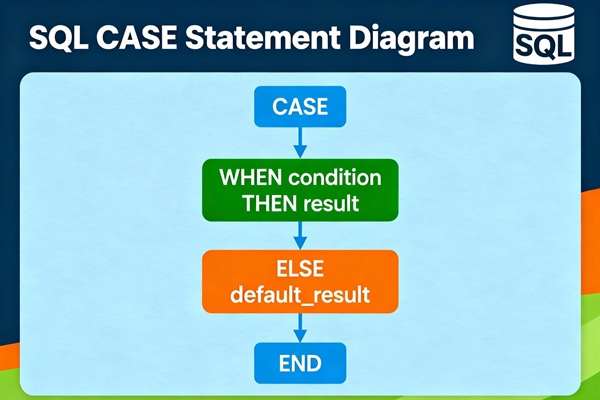
The CASE statement goes through conditions and returns a value when the first condition is met (like an if-then-else statement). So, once a condition is true, it will stop reading and return the result. If no conditions are true, it returns the value in the ELSE clause.
If there is no ELSE part and no conditions are true, it returns NULL.
SQL CASE Statement with examples:
The SQL CASE statement — like an “if-then-else” structure — that lets you return different values depending on specified conditions. It’s used inside queries to create new derived columns or control logic in SELECT, UPDATE, ORDER BY, and other clauses.
SQL CASE Syntax
CASE
WHEN condition1 THEN result1
WHEN condition2 THEN result2
WHEN conditionN THEN resultN
ELSE result
END;
Basic Syntax
CASE
WHEN condition1 THEN result1
WHEN condition2 THEN result2
…
ELSE resultN
END
The database checks each WHEN condition in order.
When it finds the first condition that’s TRUE, it returns the corresponding THEN result.
If no condition is true, it returns the ELSE result (if provided).
SQL CASE Examples:
Let’s use a small table called employees:
| emp_id | name | department | salary | hire_year |
|---|---|---|---|---|
| 1 | Alice | IT | 95000 | 2018 |
| 2 | Bob | HR | 65000 | 2020 |
| 3 | Carol | IT | 55000 | 2019 |
| 4 | David | Finance | 75000 | 2017 |
| 5 | Eva | Marketing | 45000 | 2022 |
Example 1: CASE in SELECT — Salary Categories
We’ll categorize employees based on salary range.
SELECT
name,
department,
salary,
CASE
WHEN salary >= 90000 THEN ‘High’
WHEN salary BETWEEN 60000 AND 89999 THEN ‘Medium’
ELSE ‘Low’
END AS salary_level
FROM employees;
Result:
| name | department | salary | salary_level |
|---|---|---|---|
| Alice | IT | 95000 | High |
| Bob | HR | 65000 | Medium |
| Carol | IT | 55000 | Low |
| David | Finance | 75000 | Medium |
| Eva | Marketing | 45000 | Low |
Explanation:
Each row is evaluated, and a new derived column (salary_level) is added based on the salary.
Example 2: CASE in ORDER BY — Custom Sort
Sort employees by salary_level, but in Low → Medium → High order (not alphabetically).
SELECT
name,
department,
salary
FROM employees
ORDER BY
CASE
WHEN salary >= 90000 THEN 3 — High
WHEN salary BETWEEN 60000 AND 89999 THEN 2 — Medium
ELSE 1 — Low
END;
Result (sorted):
| name | department | salary |
|---|---|---|
| Eva | Marketing | 45000 |
| Carol | IT | 55000 |
| Bob | HR | 65000 |
| David | Finance | 75000 |
| Alice | IT | 95000 |
Explanation:
Instead of sorting alphabetically, we map each range to a numeric rank using CASE.
Example 3: CASE in UPDATE — Conditional Raise
Give different salary raises based on department.
UPDATE employees
SET salary =
CASE
WHEN department = ‘IT’ THEN salary * 1.10
WHEN department = ‘HR’ THEN salary * 1.05
ELSE salary * 1.03
END;
Explanation:
IT employees get a 10% raise.
HR employees get a 5% raise.
Everyone else gets 3%.
Example 4: CASE with Aggregate Functions (SUM)
Suppose we have a sales table:
| region | amount |
|---|---|
| East | 1000 |
| West | 800 |
| East | 1200 |
| North | 600 |
| West | 900 |
We can compute conditional totals using SUM(CASE...).
Result:
| east_sales | west_sales | north_sales |
|---|---|---|
| 2200 | 1700 | 600 |
Explanation:
-
Each
CASEfilters amounts by region inside the aggregate. -
This is like pivoting data horizontally.
Example 5: Nested CASE
Combine multiple CASE layers for complex rules:
Result:
| name | department | salary | level_description |
|---|---|---|---|
| Alice | IT | 95000 | Tech High |
| Bob | HR | 65000 | Mid Level |
| Carol | IT | 55000 | Low Level |
| David | Finance | 75000 | Mid Level |
| Eva | Marketing | 45000 | Low Level |
Explanation:
The outer CASE checks salary, and the inner one refines classification for IT staff.
Summary SQL CASE Statement:
| Use Case | Example | Purpose |
|---|---|---|
| Derived Columns | CASE in SELECT |
Create new computed fields |
| Custom Sorting | CASE in ORDER BY |
Sort by custom logic |
| Conditional Updates | CASE in UPDATE |
Modify data conditionally |
| Conditional Aggregation | SUM(CASE WHEN ...) |
Aggregate selectively |
| Complex Logic | Nested CASE |
Multi-level conditions |
Scenario: Sales Reporting Example
Imagine you have a table named sales with the following columns:
| sale_id | region | product | amount | sale_date |
|---|---|---|---|---|
| 1 | East | Laptop | 1200 | 2025-01-15 |
| 2 | West | Phone | 800 | 2025-01-16 |
| 3 | East | Tablet | 300 | 2025-01-18 |
| 4 | East | Laptop | 1500 | 2025-02-05 |
| 5 | West | Laptop | 1000 | 2025-02-06 |
| 6 | South | Phone | 600 | 2025-02-10 |
| 7 | East | Phone | 700 | 2025-02-12 |
| 8 | West | Tablet | 400 | 2025-02-14 |
| 9 | East | Laptop | 900 | 2025-03-01 |
| 10 | South | Tablet | 250 | 2025-03-03 |
Goal
We want to produce a regional sales performance report with:
-
Total sales per region
-
Total sales for each product type (Laptop, Phone, Tablet)
-
Classification of regions as “High”, “Medium”, or “Low” performers based on total sales
Step 1: Aggregate with CASE
We’ll use SUM with CASE to conditionally count amounts for each product.
Explanation:
-
Each
CASEchecks theproducttype and sums only matching amounts. -
The
ELSE 0ensures non-matching rows contribute zero, keeping totals correct. -
SUM(amount)gives total sales per region.
Result:
| region | laptop_sales | phone_sales | tablet_sales | total_sales |
|---|---|---|---|---|
| East | 3600 | 700 | 300 | 4600 |
| West | 1000 | 800 | 400 | 2200 |
| South | 0 | 600 | 250 | 850 |
Step 2: Add Classification with Another CASE
Now, let’s classify each region’s total sales performance.
Result:
| region | laptop_sales | phone_sales | tablet_sales | total_sales | performance_category |
|---|---|---|---|---|---|
| East | 3600 | 700 | 300 | 4600 | High Performer |
| West | 1000 | 800 | 400 | 2200 | Medium Performer |
| South | 0 | 600 | 250 | 850 | Low Performer |
Step 3: Combine with Time Logic (Optional)
You can even mix date-based logic in your CASE to see trends:
This gives you month-by-month breakdowns per region, plus an overall classification.
Step 4: Nested CASE Example (Advanced)
You can even nest CASE statements for more complex classification:
Result:
| region | total_sales | performance_detail |
|---|---|---|
| East | 4600 | Laptop-Driven High Performer |
| West | 2200 | Moderate Performer |
| South | 850 | Underperformer |
Step 5: Use CASE with Aggregates in HAVING
You can also filter using aggregates:
Returns only regions where Laptop sales > 1000.
Below are 9 deep-dive, real-world questions that go far beyond simple conditional logic.
Each comes with an example (based on your sales table), expected output.
1. Classify Sales by Multiple Conditions (Nested CASE)
Question:
Classify each sale as High-End Laptop, Mid-Range Electronics, or Budget Device using nested CASE logic.
SELECT
sale_id,
product,
amount,
CASE
WHEN product = ‘Laptop’ AND amount > 1200 THEN ‘High-End Laptop’
WHEN product = ‘Phone’ AND amount BETWEEN 600 AND 900 THEN ‘Mid-Range Electronics’
WHEN product = ‘Tablet’ AND amount < 400 THEN ‘Budget Device’
ELSE ‘Standard Item’
END AS category
FROM sales;
Output:
| sale_id | product | amount | category |
|---|---|---|---|
| 1 | Laptop | 1200.00 | Standard Item |
| 2 | Phone | 800.00 | Mid-Range Electronics |
| 3 | Tablet | 300.00 | Budget Device |
| 4 | Laptop | 1500.00 | High-End Laptop |
| 8 | Tablet | 400.00 | Standard Item |
| 14 | Laptop | 1300.00 | High-End Laptop |
2. Conditional Aggregation with Multiple CASE Layers
Question:
Show each region’s total sales, plus separate sums for Laptop > 1000 and Phone < 700.
SELECT
region,
SUM(amount) AS total_sales,
SUM(CASE WHEN product = ‘Laptop’ AND amount > 1000 THEN amount ELSE 0 END) AS premium_laptop_sales,
SUM(CASE WHEN product = ‘Phone’ AND amount < 700 THEN amount ELSE 0 END) AS budget_phone_sales
FROM sales
GROUP BY region;
Output:
| region | total_sales | premium_laptop_sales | budget_phone_sales |
|---|---|---|---|
| East | 8300.00 | 3800.00 | 1350.00 |
| West | 5550.00 | 2300.00 | 0.00 |
| South | 2270.00 | 700.00 | 900.00 |
| North | 3400.00 | 2000.00 | 450.00 |
3. Using CASE with Window Functions
Question:
Show each salesperson’s total sales and flag the top performer per region.
SELECT
region,
salesperson,
SUM(amount) AS total_sales,
CASE
WHEN SUM(amount) = MAX(SUM(amount)) OVER (PARTITION BY region)
THEN ‘Top Performer’
ELSE ”
END AS performance_flag
FROM sales
GROUP BY region, salesperson;
Output:
| region | salesperson | total_sales | performance_flag |
|---|---|---|---|
| East | Alice | 4700.00 | Top Performer |
| East | Frank | 2300.00 | |
| East | Carol | 800.00 | |
| West | Dave | 2300.00 | Top Performer |
| West | Bob | 1700.00 | |
| West | Gina | 750.00 | |
| South | Eve | 1720.00 | Top Performer |
| South | Hank | 550.00 | |
| North | Ivy | 3400.00 | Top Performer |
4. CASE inside ORDER BY for Custom Multi-Logic Sorting
Question:
Sort products: Laptops (high first), Phones (low first), Tablets (alphabetical salesperson).
SELECT product, amount, salesperson
FROM sales
ORDER BY
CASE
WHEN product = ‘Laptop’ THEN amount * -1
WHEN product = ‘Phone’ THEN amount
ELSE 0
END,
CASE WHEN product = ‘Tablet’ THEN salesperson END;
Output (Top 8 rows)
| product | amount | salesperson |
|---|---|---|
| Laptop | 1500.00 | Alice |
| Laptop | 1300.00 | Dave |
| Laptop | 1200.00 | Alice |
| Laptop | 1100.00 | Alice |
| Laptop | 1000.00 | Dave |
| Laptop | 900.00 | Alice |
| Phone | 300.00 | Hank |
| Phone | 450.00 | Ivy |
5. Multi-Conditional GROUP Filtering
Question:
Show only those regions where Laptop sales > 3000 and Phone sales < 2000.
SELECT region
FROM sales
GROUP BY region
HAVING
SUM(CASE WHEN product = ‘Laptop’ THEN amount ELSE 0 END) > 3000
AND SUM(CASE WHEN product = ‘Phone’ THEN amount ELSE 0 END) < 2000;
Output:
| region |
|---|
| East |
6. Time-Based Classification with CASE
Question:
Categorize each sale as Q1, Q2, Q3, or Q4 based on its sale_date.
SELECT
sale_id,
sale_date,
CASE
WHEN MONTH(sale_date) BETWEEN 1 AND 3 THEN ‘Q1’
WHEN MONTH(sale_date) BETWEEN 4 AND 6 THEN ‘Q2’
WHEN MONTH(sale_date) BETWEEN 7 AND 9 THEN ‘Q3’
ELSE ‘Q4’
END AS quarter
FROM sales;
Output:
| sale_id | sale_date | quarter |
|---|---|---|
| 1 | 2025-01-05 | Q1 |
| 10 | 2025-02-12 | Q1 |
| 16 | 2025-03-01 | Q1 |
7. CASE with NULL Handling
Question:
Replace missing product names or regions with placeholders.
SELECT
sale_id,
CASE WHEN product IS NULL THEN ‘Unknown Product’ ELSE product END AS product_name,
CASE WHEN region IS NULL THEN ‘Unknown Region’ ELSE region END AS region_name
FROM sales;
Output:
| sale_id | product_name | region_name |
|---|---|---|
| 1 | Laptop | East |
| 2 | Phone | West |
| … | … | … |
8. Combining CASE with Joins
Question:
If a salesperson has total sales > 4000, label them as “Elite”; else “Regular”.
SELECT
s.salesperson,
SUM(s.amount) AS total_sales,
CASE
WHEN SUM(s.amount) > 4000 THEN ‘Elite’
ELSE ‘Regular’
END AS category
FROM sales s
GROUP BY s.salesperson;
Output(Top 4 rows):
| salesperson | total_sales | category |
|---|---|---|
| Alice | 4700.00 | Elite |
| Frank | 2300.00 | Strong |
| Eve | 1720.00 | Regular |
| Ivy | 3400.00 | Strong |
9. Pivot Simulation using CASE
Question:
Create a “pivot-like” summary: each product as a column with its total amount per region.
SELECT
region,
SUM(CASE WHEN product = ‘Laptop’ THEN amount ELSE 0 END) AS laptop_total,
SUM(CASE WHEN product = ‘Phone’ THEN amount ELSE 0 END) AS phone_total,
SUM(CASE WHEN product = ‘Tablet’ THEN amount ELSE 0 END) AS tablet_total
FROM sales
GROUP BY region;
Output(Top 4 rows):
| region | laptop_total | phone_total | tablet_total |
|---|---|---|---|
| East | 4700.00 | 2300.00 | 800.00 |
| West | 2300.00 | 1700.00 | 750.00 |
| South | 700.00 | 900.00 | 670.00 |
| North | 2800.00 | 450.00 | 150.00 |
Summary of Advanced CASE Use Cases:
| # | Use Case | Concept | Clause Used |
|---|---|---|---|
| 1 | Nested logic | Multi-condition classification | SELECT |
| 2 | Conditional aggregation | Multi-filter SUMs | SELECT + GROUP BY |
| 3 | Ranking | Window + CASE | SELECT |
| 4 | Custom sorting | Multi-layer ORDER BY | ORDER BY |
| 5 | Conditional group filter | Multi-condition HAVING | HAVING |
| 6 | Conditional update | Bulk transformation | UPDATE |
| 7 | Time categorization | Date-based CASE | SELECT |
| 8 | NULL-safe logic | Handle missing values | SELECT |
| 9 | Aggregate classification | Conditional label after SUM | SELECT + GROUP BY |
| 10 | Pivot simulation | Convert rows → columns | SELECT + GROUP BY |