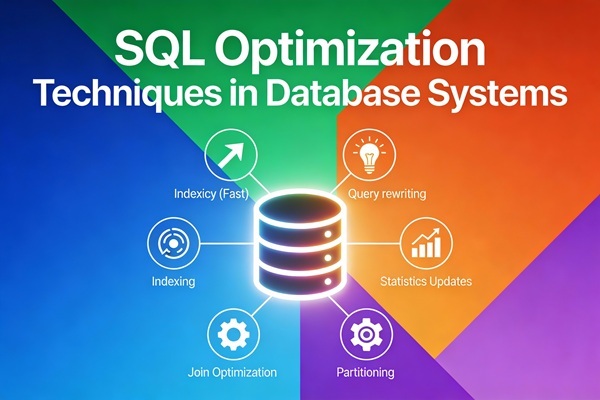
Top 10 SQL Query Optimization Techniques – Do you want to speed up internal intel gathering, or ensure your customers don’t get bored and bounce? Let’s take a look at why you should be optimizing your SQL queries for better database management.
Query Optimization in SQL is the process of refining queries for faster, more efficient data retrieval. As data scales, optimized queries become crucial to minimize costs and maintain performance.
By optimizing queries to retrieve only necessary data (e.g., through database indexing on frequently queried fields), the platform can process transactions in real time, reducing server strain, enabling smooth checkouts, and protecting revenue.
Top 10 SQL Query Optimization Techniques – What is SQL Query Optimization?
SQL query optimization refers to the process of ensuring your queries are running efficiently, resulting in reduced load times, less resource consumption, and higher performance of your database. Optimizing SQL queries also helps data teams identify and improve poor query performance.
The goal of SQL query optimization is improved database efficiency and performance, and that means minimizing the response time of your queries by best utilizing your system resources. At-a-glance, the goals of SQL query optimization are:
Reduce response time
Reduced CPU execution time
Improved throughput
The more complex your queries, the more it can cost to run them. SQL query optimization ensures you have the lowest runtimes and the lowest costs, increasing your overall database efficiency.
Let’s dive into the ten best practices for improving SQL query optimization.
1. Use Proper Indexing
How indexes work
Indexes are data structures that improve the speed at which data is retrieved. They work by creating a sorted copy of the indexed columns, which allows the database to quickly pinpoint the rows that match our query, saving us a lot of time.
There are three main types of indexes in databases:
- Clustered indexes – Physically order data based on column values and are best used for sequential or sorted data with no duplicates, such as primary keys.
- Non-clustered indexes – Create two separate columns, making them suitable for mapping tables or glossaries.
- Full-text indexes – Used to search large text fields, like articles or emails, by storing the positions of terms within the text.
So, how can we use indexes to improve the performance of SQL queries? Let’s see some best practices:
- Index frequently queried columns. If we usually search a table using
customer_idoritem_id, indexing those columns will greatly impact speed. Check below how to create an index:
CREATE INDEX index_customer_id ON customers (customer_id);- Avoid using unnecessary indexes. While indexes are very helpful for speeding up
SELECTqueries, they can slightly slow downINSERT,UPDATE, andDELETEoperations. This is because the index needs to be updated every time you modify data. So, too many indexes can slow things down by increasing the overhead for data modifications. - Choose the right index type. Different databases offer various index types. We should pick the one that best suits our data and query patterns. For example, a B-tree index is a good choice if we often search for ranges of values.
Main Types of Indexes in SQL
- Primary Key Index
- Unique Index
- Non-Clustered Index
- Clustered Index
- Composite (Multi-Column) Index
- Full-Text Index
- Filtered Index (SQL Server)
- Hash Index (PostgreSQL/MariaDB)
- Spatial Index
Sample Table: employees:
CREATE TABLE employees (
emp_id INT PRIMARY KEY,
name VARCHAR(50),
department VARCHAR(20),
email VARCHAR(100),
salary INT,
join_date DATE,
status VARCHAR(10)
);
INSERT INTO employees VALUES
(1,’Arjun’,’HR’,’arjun@corp.com’,45000,’2024-01-01′,’Active’),
(2,’Riya’,’IT’,’riya@corp.com’,60000,’2023-11-11′,’Active’),
(3,’Karan’,’IT’,’karan@corp.com’,55000,’2023-10-20′,’Active’),
(4,’Neha’,’Finance’,’neha@corp.com’,50000,’2023-06-15′,’Inactive’),
(5,’Amit’,’IT’,’amit@corp.com’,65000,’2024-02-01′,’Active’),
(6,’Simran’,’Sales’,’simran@corp.com’,40000,’2022-12-01′,’Inactive’),
(7,’Rohan’,’Sales’,’rohan@corp.com’,42000,’2023-03-05′,’Active’),
(8,’Manish’,’Finance’,’manish@corp.com’,48000,’2023-04-10′,’Active’),
(9,’Tina’,’IT’,’tina@corp.com’,70000,’2023-08-12′,’Active’),
(10,’Varun’,’IT’,’varun@corp.com’,62000,’2023-07-17′,’Active’),
(11,’Sita’,’HR’,’sita@corp.com’,47000,’2022-11-10′,’Inactive’),
(12,’Dev’,’IT’,’dev@corp.com’,72000,’2024-03-03′,’Active’),
(13,’Anu’,’Finance’,’anu@corp.com’,52000,’2024-01-20′,’Active’),
(14,’Mohan’,’HR’,’mohan@corp.com’,46000,’2023-05-11′,’Inactive’),
(15,’Asha’,’Sales’,’asha@corp.com’,41000,’2024-02-19′,’Active’),
(16,’Farhan’,’IT’,’farhan@corp.com’,64000,’2024-04-15′,’Active’),
(17,’Kriti’,’Marketing’,’kriti@corp.com’,53000,’2023-09-14′,’Active’),
(18,’Vivek’,’Marketing’,’vivek@corp.com’,51000,’2023-08-05′,’Inactive’),
(19,’Pooja’,’IT’,’pooja@corp.com’,69000,’2022-10-25′,’Active’),
(20,’Zara’,’Sales’,’zara@corp.com’,43000,’2023-01-27′,’Active’);
1. Primary Key Index
Automatically created.
✔ Used for: Fast search on unique ID, Ensures no duplicates
2. Unique Index
Ensures values must be unique.
CREATE UNIQUE INDEX idx_email_unique

ON employees(email);
Sample Query:
3. Non-Clustered Index (Most common)
Query that uses this index:
4. Clustered Index
(Only ONE per table. In MySQL InnoDB it is automatically the PRIMARY KEY.)
If you want to change the clustered index (SQL Server example):
5. Composite Index (Multi-Column)
Order matters!
CREATE INDEX idx_dept_salary

ON employees(department, salary);
Query benefiting from this:
6. Full-Text Index
Used for searching text in large columns.
Query:
7. Filtered Index (SQL Server)
8. Hash Index (PostgreSQL Example)
9. Spatial Index
Used for geo-locations (not used in this simple example).
Summary Table
| Index Type | Purpose | Example Column |
|---|---|---|
| Primary Key | Unique row identification | emp_id |
| Unique | No duplicates | |
| Non-clustered | Fast WHERE filters | department |
| Clustered | Sorts table physically | join_date |
| Composite | Filters using multiple columns | department + salary |
| Full-Text | Keyword search | name |
| Filtered | Index subset of rows | status=’Active’ |
| Hash | Fast equality search | |
| Spatial | Geo-coordinates | location |
2. Avoid SELECT *
Use the SELECT statement optimally, instead of always fetching all data from the table. Fetch only the necessary data from the table, thereby avoiding the costs of transferring unwanted data and processing it.
Inefficient
SELECT * FROM Business
Efficient
SELECT Name, Phone, Address, CompanyZip FROM Business
This query is much simpler, and only pulls the required details from the table
3. Use Joins Efficiently
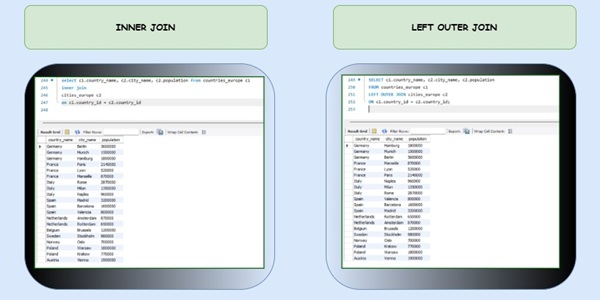
Using appropriate JOIN types improves SQL performance. INNER JOINs are generally more efficient than LEFT JOINs when retrieving matching data only.
Example: For retrieving customer profiles associated with specific accounts, using an INNER JOIN on account_id between customer and account tables fetches only relevant records which is especially useful in high-traffic queries where response time is critical.
Use the right type:
- Inner Join: Only keeps matches. This should be your default.
- Left Join: Keeps everything from the left table. Use when you need all records from one side.
- Right Join: Same as left, just flipped. You can almost always rewrite a right join as a left join, it’s easier to read and reason about.
- Outer Join: Returns everything from both tables, matched or not. Use only when absolutely necessary (read: rarely).
- Order joins logically. We should start with the tables that return the fewest rows. This reduces the amount of data that needs to be processed in subsequent joins.
- Use indexes on join columns. Again indexes are our ally. Using indexes helps the database quickly find matching rows.
- Consider using subqueries or CTEs (Common Table Expressions) to simplify complex joins:
WITH RecentOrders AS (
SELECT customer_id, order_id
FROM orders
WHERE order_date >= DATE(‘now’, ‘-30 days’)
)
SELECT c.customer_name, ro.order_id
FROM customers c
INNER JOIN RecentOrders ro ON c.customer_id = ro.customer_id;
4. Write Efficient WHERE Clauses
The WHERE clause is one of the most important parts of an SQL query because it filters rows based on conditions. However, how you write it can significantly impact performance. A common mistake is using functions or operations directly on column values in the WHERE clause — this can prevent the database from using indexes, which slows down query execution.
Non-efficient:
SELECT * FROM employees WHERE YEAR(joining_date) = 2025;
Why this is bad: The YEAR() function is applied to every value in the joining_date column. This disables the use of indexes, forcing a full table scan.
Optimized:
SELECT * FROM employees
WHERE joining_date >= ‘2022-01-01’ AND joining_date < ‘2023-01-01’;
Optimization Tips:
Don’t use functions on columns (LOWER(column), YEAR(column), etc.)
Avoid mathematical operations like salary + 5000 = 100000
Rewrite conditions to let the database use available indexes
5.Use EXISTS Instead of IN for Subqueries
When working with subqueries, we often need to check if a value exists in a set of results. We can do this with two IN or EXISTS, but EXISTS is generally more efficient, especially for larger datasets.
The IN clause reads the entire subquery result set into memory before comparing. On the other hand, the EXISTS clause stops processing the subquery as soon as it finds a match.
Here we have an example of how to use this clause:
SELECT *

FROM orders o

WHERE EXISTS (SELECT 1 FROM customers c WHERE c.customer_id = o.customer_id AND country = 'USA')
6. Normalize your tables
Normalization helps reduce redundancy and improve data integrity by structuring your tables into logical layers. The classic approach follows the first three normal forms (or NFs):
- First normal form (1NF): Make sure each column holds atomic (indivisible) values, and each record is unique. No repeating groups or comma-separated lists in one cell.
Bad: order_items = “hat, socks, shirt”
Good: One row per item in a separate order_items table.
- Second normal form (2NF): Ensure that every non-key column depends on the whole primary key, not just part of it. This mainly applies to tables with composite keys.
If you’re storing customer names in a table keyed on (customer_id, product_id), that violates 2NF because customer name depends only on customer_id.
- Third normal form (3NF): Eliminate columns that don’t depend directly on the primary key. If orders includes both customer_id and customer_email, move the email to the customers table. That way, customer info only lives in one place.
These principles help you build clean, consistent data models, but going too deep can make querying painful. At scale, over-normalization leads to heavy joins, slower performance, and frustrated analysts.
Many teams adopt a hybrid approach: normalize your source-of-truth data (e.g. users, products), but denormalize for analytics use cases where speed matters more than purity.
It’s about finding that sweet spot where your schema is both accurate and easy to work with.
7.Monitor query performance:
Checking on the run-time of your queries is key to identifying your poor performance queries. This allows you to optimize them, improve efficiency, and reduce costs.
Query profiling is one way of monitoring the performance of your queries. This involves analyzing statistics such as run time and amount of rows returned, looking at server speeds, database logs, and external factors to identify problem areas.
- Single-table: Single-table hints are specified on one table or view. INDEX and USE_NL are examples of single-table hints.
- Multi-table: Multi-table hints specify one or more tables or views. LEADING is an example of a multi-table hint. Note that USE_NL(table1 table2) is not considered a multi-table hint because it is a shortcut for USE_NL(table1) and USE_NL(table2).
- Query block: Query block hints operate on single query blocks. STAR_TRANSFORMATION and UNNEST are examples of query block hints.
8. Databases Optimization:
Redshift Optimization
Learn how Redshift manages optimization for your cloud data warehouse. Learn when to manually tune the database further for more performance for SQL queries.
BigQuery Optimization
Learn how BigQuery optimizes your database through specific hardware optimization strategies.
Snowflake Optimization
Snowflake is a powerful cloud database. Learn how it optimizes your database automatically, and hot to increase performance manually.
9. Utilize stored procedures
A stored procedure is a set of SQL commands we save in our database so we don’t have to write the same SQL repeatedly. We can think of it as a reusable script.
When we need to perform a certain task, like updating records or calculating values, we just call the stored procedure. It can take input, do some work, such as querying or modifying data, and even return a result. Stored procedures help speed things up since the SQL is precompiled, making your code cleaner and easier to manage.
We can create a stored procedure in PostgreSQL as follows:
CREATE OR REPLACE PROCEDURE insert_employee(

emp_id INT,

emp_first_name VARCHAR,

emp_last_name VARCHAR

)

LANGUAGE plpgsql

AS $

BEGIN

-- Insert a new employee into the employees table

INSERT INTO employees (employee_id, first_name, last_name)

VALUES (emp_id, emp_first_name, emp_last_name);

END;

$;
— call the procedureCALL insert_employee(101, ‘John’, ‘Doe’);
10. Partition Large Tables
Partitioning helps by breaking a large table into smaller, more manageable chunks. Queries on partitions are faster as they scan only relevant data.
Example:
- Partition sales data by year or region
Why This Matters:
- Speeds up scans on large datasets
- Helps with parallelism and archiving
- Makes indexes more effective within partitions
ALTER TABLE sales
ADD PARTITION (PARTITION p2025 VALUES LESS THAN (2026));
Use UNION ALL Instead of UNION:
When we want to combine results from multiple queries into one list, we can use the UNION and UNION ALL clauses. Both combine the results of two or more SELECT statements when they have the same column names. However, they are not the same, and their difference makes them suitable for different use cases.
The UNION clause removes duplicate rows, which requires more processing time.
On the other hand, UNION ALL combines the results but keeps all rows, including duplicates. So, if we don’t need to remove duplicates, we should use UNION ALL for better performance.
On the other hand, UNION ALL combines the results but keeps all rows, including duplicates. So, if we don’t need to remove duplicates, we should use UNION ALL for better performance.
— Potentially slower
SELECT product_id FROM products WHERE category = ‘Electronics’
UNION
SELECT product_id FROM products WHERE category = ‘Books’;
— Potentially faster
SELECT product_id FROM products WHERE category = ‘Electronics’
UNION ALL
SELECT product_id FROM products WHERE category = ‘Books’;
Conclusion | Final thoughts:
Optimizing SQL queries is a critical skill for developers and DBAs alike. By applying the strategies outlined above, including appropriate indexing, avoiding costly operations, and leveraging the database’s features, one can significantly enhance the performance of their database applications. Continuous learning and performance monitoring are key to maintaining and improving query efficiency.
Common Challenges in SQL Query Optimization
SQL database optimization often involves navigating obstacles that can hinder performance. Here are key challenges and effective solutions to address them:
1. Handling complex queries
Complex queries with multiple joins and subqueries can slow down databases.
Solution: Break down complex queries into manageable segments, or use temporary tables to store intermediate results. Replacing subqueries with JOINs can also reduce processing time.
2. Managing high-traffic databases
High-traffic databases experience strain, especially during peak times, affecting query responsiveness.
Solution: Use data caching for frequently accessed information and table partitioning to split large datasets, balancing the load and improving response times.
3. Maintaining consistent performance over time
Databases can experience degradation as data grows, affecting query efficiency.
Solution: Perform routine database audits to detect performance issues, regularly update execution plans, and adjust index structures to keep databases responsive.
4. Handling resource constraints
Limited CPU, memory, or disk resources can bottleneck query performance.
Solution: Implement resource monitoring to identify heavy queries, and optimize by minimizing data retrieval and avoiding unnecessary calculations, ensuring efficient resource use.
By proactively addressing these challenges, businesses can maintain SQL performance and support efficient data operations.
Frequently Asked Questions for Top 10 SQL Query Optimization Techniques
Does SQL automatically optimize queries?
SQL engines include query optimizers that automatically restructure queries for efficiency, though developers can further enhance performance by writing optimized SQL.
How to optimize SQL query with multiple JOINs?
Optimize SQL queries with multiple JOINs by selecting appropriate join types, using proper matching keys, and employing techniques like common table expressions to simplify complex joins.
What is normalization in SQL?
Normalization in SQL is the process of organizing data to minimize redundancy and improve data integrity by splitting tables and defining relationships between them.
What is indexing in SQL?
Indexing in SQL creates data structures that allow quick lookup of rows based on column values, greatly improving the speed of data retrieval operations.
What is the main aim of query optimization?
The main aim of query optimization is to enhance database efficiency and performance by reducing response time and resource consumption during query execution.
How do indexes improve SQL query performance?
Indexes improve SQL query performance by enabling the database engine to locate data quickly without scanning entire tables, thereby reducing I/O and speeding up query execution.