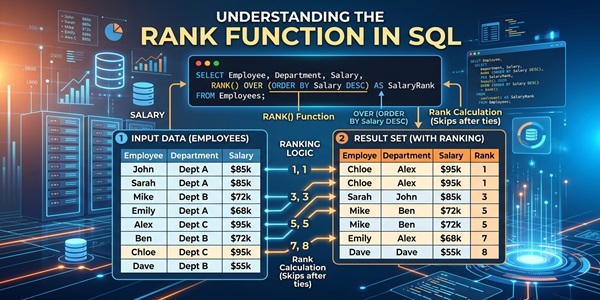
Rank Function in SQL RANK() – SQL RANK functions also knows as Window Functions. It assigns a unique rank to each row within a partition of data, based on the specified order. Rows with the same rank value have the same data in the ordered column, and a gap will be left after duplicate values.
Rank Function in SQL:
Syntax:
SELECT column1, column2,
RANK() OVER(PARTITION BY partition_column ORDER BY order_column) AS rank
FROM table;
Rank Function in SQL Example:
SELECT Salesperson, Region, Sales,
RANK() OVER(PARTITION BY Region ORDER BY Sales DESC) AS Rank
FROM Sales;
Here, This query ranks salespersons by sales within each region. If two salespersons have the same sales amount, they receive the same rank, and the next rank skips by that count (gaps in ranking).
RANK() is a SQL analytical function that assigns a unique rank or position to each row within a result set based on specific criteria. This function is particularly useful when you want to identify the top or bottom performers within a dataset or create a leaderboard.
What is PARTITION BY?
PARTITION BY is another SQL clause often used in conjunction with analytical functions like RANK(). It allows you to divide your result set into partitions or subsets based on one or more columns. This is helpful when you want to perform ranking or analytics within each subset independently.
How to Use PARTITION BY with RANK():
When you combine RANK() with PARTITION BY, you can calculate rankings within specific groups or partitions, rather than ranking all rows together.
Rank Function in SQL | Classify Employees Based on Rank:
CREATE TABLE EmployeeSalary
(
EmpID INT,
EmpName VARCHAR(50),
Salary INT
);
INSERT INTO EmployeeSalary VALUES
(1,’John’,90000),
(2,’Sarah’,85000),
(3,’Mike’,85000),
(4,’Emma’,75000),
(5,’David’,70000),
(6,’Lisa’,65000),
(7,’Chris’,60000),
(8,’Sophia’,55000);
SELECT
EmpName,
Salary,
RANK() OVER(ORDER BY Salary DESC) AS SalaryRank,
CASE
WHEN RANK() OVER(ORDER BY Salary DESC) = 1
THEN ‘Top Performer’
WHEN RANK() OVER(ORDER BY Salary DESC) <= 3
THEN ‘High Performer’
WHEN RANK() OVER(ORDER BY Salary DESC) <= 5
THEN ‘Average Performer’
ELSE ‘Needs Improvement’
END AS PerformanceCategory
FROM EmployeeSalary;
Output:
| EmpName | Salary | Rank | Category |
|---|---|---|---|
| John | 90000 | 1 | Top Performer |
| Sarah | 85000 | 2 | High Performer |
| Mike | 85000 | 2 | High Performer |
| Emma | 75000 | 4 | Average Performer |
| David | 70000 | 5 | Average Performer |
| Lisa | 65000 | 6 | Needs Improvement |
| Chris | 60000 | 7 | Needs Improvement |
| Sophia | 55000 | 8 | Needs Improvement |
Rank Function in SQL Using CTE:
WITH SalaryRanking AS
(
SELECT
EmpName,
Salary,
RANK() OVER(ORDER BY Salary DESC) AS SalaryRank
FROM EmployeeSalary
)
SELECT *,
CASE
WHEN SalaryRank = 1
THEN ‘Top Performer’
WHEN SalaryRank <= 3
THEN ‘High Performer’
WHEN SalaryRank <= 5
THEN ‘Average Performer’
ELSE ‘Needs Improvement’
END AS Category
FROM SalaryRanking;
Top 10%, Top 25%, Others
WITH RankedEmployees AS
(
SELECT *,
RANK() OVER(ORDER BY Salary DESC) AS SalaryRank,
COUNT(*) OVER() AS TotalEmployees
FROM EmployeeSalary
)
SELECT *,
CASE
WHEN SalaryRank <= TotalEmployees*0.10
THEN ‘Top 10%’
WHEN SalaryRank <= TotalEmployees*0.25
THEN ‘Top 25%’
ELSE ‘Remaining Employees’
END AS EmployeeBand
FROM RankedEmployees;
Rank Function in SQL | Department-wise Ranking with CASE:
CREATE TABLE EmployeeDept
(
EmpID INT,
EmpName VARCHAR(50),
Department VARCHAR(20),
Salary INT
);
INSERT INTO EmployeeDept VALUES
(1,’John’,’IT’,90000),
(2,’Sarah’,’IT’,85000),
(3,’Mike’,’IT’,75000),
(4,’Emma’,’HR’,70000),
(5,’David’,’HR’,65000),
(6,’Lisa’,’Sales’,95000),
(7,’Chris’,’Sales’,90000),
(8,’Sophia’,’Sales’,85000);
WITH DeptRanking AS
(
SELECT *,
RANK() OVER(
PARTITION BY Department
ORDER BY Salary DESC
) AS DeptRank
FROM EmployeeDept
)
SELECT *,
CASE
WHEN DeptRank = 1
THEN ‘Department Champion’
WHEN DeptRank = 2
THEN ‘Runner Up’
ELSE ‘Participant’
END AS Status
FROM DeptRanking;
Output:
| Department | Employee | Rank | Status |
|---|---|---|---|
| IT | John | 1 | Department Champion |
| IT | Sarah | 2 | Runner Up |
| IT | Mike | 3 | Participant |
| HR | Emma | 1 | Department Champion |
| HR | David | 2 | Runner Up |
| Sales | Lisa | 1 | Department Champion |
| Sales | Chris | 2 | Runner Up |
| Sales | Sophia | 3 | Participant |
Frequently Asked Questions (FAQ) regarding “Rank Function in SQL RANK()”
1. What is the RANK() function in SQL, and why is it used?
The RANK() function is a window function that assigns a ranking number to each row based on a specified sorting order. It is commonly used to create leaderboards, identify top performers, find highest or lowest values, and compare records within a dataset. The ranking starts from 1, and rows with the same value receive the same rank.
2. How does SQL assign ranks when multiple rows have the same value?
When two or more rows have identical values in the column used for ranking, SQL assigns the same rank to all of them. Since those rows share a position, the next rank is skipped. For example, if two employees are ranked 2nd because they have the same salary, the next employee will receive rank 4 instead of rank 3.
3. What is the role of the ORDER BY clause in the RANK() function?
The ORDER BY clause determines the sequence in which ranks are assigned. Without it, SQL would not know how to compare rows and generate rankings. If salaries are ordered in descending order, the highest salary gets Rank 1. If ordered in ascending order, the lowest salary gets Rank 1. Therefore, the ranking outcome completely depends on the sorting criteria specified in the ORDER BY clause.
4. How does PARTITION BY affect the behavior of the RANK() function?
The PARTITION BY clause divides the result set into separate groups and applies ranking independently within each group. For example, if employees belong to different departments, using PARTITION BY Department will restart the ranking from 1 for each department. This allows comparisons within a group rather than across the entire table.
5. When should RANK() be preferred over ROW_NUMBER() and DENSE_RANK()?
RANK() should be used when tied values need to share the same position and skipped ranks are acceptable. It is ideal for competition-style rankings such as sports tournaments, employee performance rankings, and sales leaderboards. If every row must have a unique sequential number, ROW_NUMBER() is a better choice. If tied values should share the same rank without skipping subsequent numbers, DENSE_RANK() should be used instead.